

What is UBO Verify?
UBO Verify automates the analysis of corporate ownership structures and calculates ultimate beneficial ownership at the click of a button, meaning accurate UBO identification in minutes not hours. The UBO Verify API and portal application are a tool which sits on top of the Kyckr registry network, retrieving profile information across jurisdictions and automatically analysing it to calculate ownership.This guide covers the core request/poll workflow, jointly held shares, reasons for non-continuation, and continuation keys. For the ownership-analysis fields (
uboAnalysisField coverage metrics and required-profile recommendations), the full entity-resolution audit trail (entitySelectionMetadataField, selectedCandidatesField, previousVersionsField), representative (director and officer) edges, and potential beneficial owner detection, see the Unwrap Ownership reference and the UBO Verify release note.Search
The first step is to search the registry to find the entity. The search response will confirm whether the entity is active and provide a unique identifier for that company incodeField . The codeField can then be used to unwrap an ownership structure alongside the jurisdiction ISO of where that entity is based.
Search guide
About the registration authority returned from search
In some jurisdictions, the search will return additional fields for registration authority:registrationAuthorityField and registrationAuthorityCodeField
If the registration authority is specified in the search response, pass the value of the Registration Authority Code as a parameter to order a UBO Report. Passing the registrationAuthorityField helps to find and order shareholder profiles for the company of interest.
If search does not return a registration authority field, it is not necessary to provide a registration authority in a UBO request.
Request a report
To order a UBO report from Kyckr using Registry data, the following variables are needed:
Request ownership tree API reference
Example create request for a UBO ownership tree report
Response
orderIdField.
Download the UBO ownership tree report
Once the call to create the ownership tree is made, the report can be retrieved by polling the request ownership tree endpoint with the order id. As this service is processing multiple entities (potentially across multiple registries), the time to make a complete report is dependent on the complexity of the ownership structure. Retrieve ownership tree API referenceExample poll request to download an UBO ownership tree report
Pending response
While the report is being prepared, the status will return as"statusField": "IN_PROGRESS".
Example pending response
Status Field Values
ThestatusField in the response indicates the current state of the ownership tree request:
What information is returned by UBO Verify?
- List of UBOs: Structured data format from a given root company.
- Shareholder Information: Clear details to build a full ownership structure.
- Node ID: A unique ID of the shareholder, traceable throughout the nodes.
- Type: The type of shareholder (PERSON, COMPANY, or OTHER).
- Edge Percentage: The percentage ownership of the entity shareholder.
- Roll-up Percentage: The calculated percentage owned of the root company.
- Enhanced Profiles: A URL link for each company in the ownership structure.
- Company Code: The company number.
- Registration Authority: The registry from which the information is retrieved.
- Accompanying PDF Report: A downloadable report available via a URL link.
Reasons for non continuation
It is not always possible to find the UBO using registry data. For example, a shareholding company may exist under the exact same name in two different countries or the next level of ownership is in a country that doesn’t have director and shareholder information available at the registry. When the ownership tree analysis cannot continue, areasonForNonContinuationField object is returned containing a typeField that indicates why the process stopped. Any layers of ownership already discovered will also be returned.
The following table describes each reason for non continuation (RFNC) type and the recommended action:
Understanding the reasonForNonContinuationField
When continuation is blocked, the response includes areasonForNonContinuationField object with the following structure:
typeField: The RFNC type from the table above (e.g., “COMPANY_NOT_FOUND”)detailsField: A human-readable explanation of why the analysis stoppedcandidatesField: An array of potential matches for selection. Populated forLOW_CONFIDENCE_MATCH, and forCOMPANY_NOT_FOUNDwhen multiple same-name matches exist
Continuation keys
A continuation key is used to continue unwrapping an ownership structure that has stopped due to a Reason for Non Continuation. For example, if the UBO search algorithm finds two companies with the same name in different countries, the reason for non-continuation would be: “Multiple matches with the same name in multiple jurisdictions.”Example reason for non continuation response
candidatesField can be selected.
How to continue a UBO discovery using a continuation key
Use the original UBO create request and add the continuation key as a parameter. If there are more than one reasons for non continuation, there may be multiple continuation keys.Example request with continuation key
Jointly held ownership
In jurisdictions such as Australia and New Zealand, shareholding can be shared. To highlight jointly owned shares there is a flag, linked ID and breakdown of shareholding in the nodes EDGE to display this.Example jointly held shares
Cached Enhanced Profiles
Any Enhanced Profiles that have been ordered are reused by the Kyckr UBO Search algorithm for up to 24 hours.- When requesting a UBO ownership tree for a company, if there is a recently ordered Enhanced Profile, it will be reused.
- If the UBO ownership tree is re-requested, previously ordered Enhanced Profiles (within the last 24 hours) will be reused, avoiding duplicate orders. This commonly occurs when rerunning the request with additional credits.
Example: Reuse of existing Enhanced Profile
An Enhanced Profile has been ordered for companyA, but the shareholders for that company are not individuals. In this case, when ordering a UBO Verify Ownership Tree report, the original Enhanced Profile for company A is reused, so long as it has been ordered within a 24 hour window.
Example: Reuse of cached data in a 24 hour window
A company’s ownership tree is requested withmaxCreditCost set to 6, and two of the companies in the tree (A, B) have had their ownership structure unwrapped. When the algorithm tries to unwrap (C) it has to stop with the reasonForNonContinuation being INSUFFICIENT_CREDITS.
To complete the ownership tree with more credits, a second call to request ownership tree is placed.
During the second call, the ownership tree is evaluated again. Profiles for (A and B) have already been ordered, so they are reused. Only the enhanced profile for company (C) will be ordered on the second run as all the data is relatively fresh.
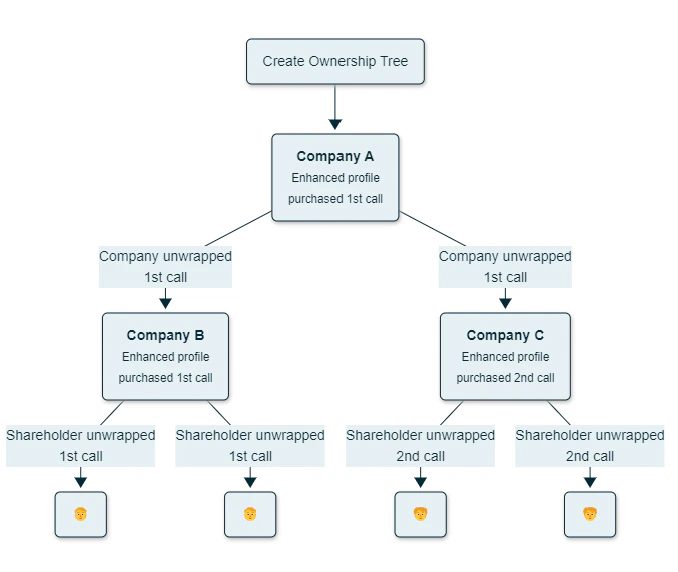
Example: Refreshing after 24 hour window has elapsed
Consider the case above, where only companies (A and B) have been unwrapped, and more credits are required to complete the ownership tree report.
If the second call to request ownership tree occurs after 24 hours, the underlying enhanced profile data for (A, B and C) are refreshed to ensure reporting accuracy.